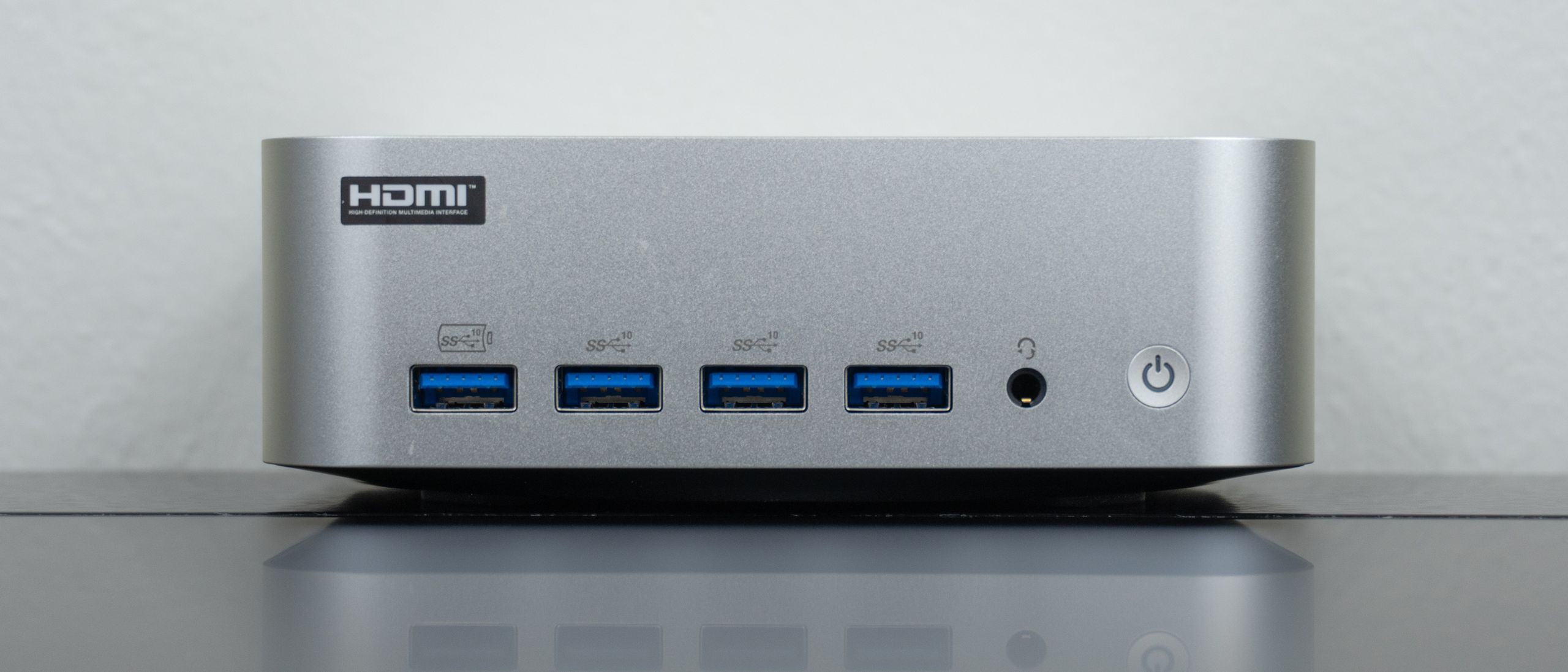
The Geekom A9 Max 2026 Edition improves on last year’s model with an upgraded AMD Ryzen AI 9 processor, though the rest of its components remain identical. However, Geekom also added its more efficient IceBlast 3.0 cooling, which lets this incredibly fast mini PC run at full power with minimal fan noise.
This new version keeps the same all-aluminum case and port selection I loved on the original, too. Just like with the standard Geekom A9 Max, you still get four handy USB-A ports on the front, with enough connectivity around back to drive up to four displays simultaneously. While you can certainly open this mini PC up to add another M.2 SSD, there’s also one of Geekom’s standard SD card readers on the side for quickly expanding your storage capacity.
At $1,799, the Geekom A9 Max 2026 Edition is certainly a pricey mini PC. However, you can typically find it for a few hundred dollars off on Geekom’s website, making it only slightly more expensive than its predecessor. That’s not bad, given that RAMageddon doesn’t look to be slowing down anytime soon.
Just like I did with the original, I’ve been using this upgraded mini PC as my daily driver for the past month. During that time, its internal fan never made a peep, and the system hasn’t missed a beat or slowed down at all. However, just like with the first-gen A9 Max, it is a bit trickier to open and upgrade than past Geekom mini PCs I’ve tested.
My Geekom A9 Max review will help you decide if this is the best mini PC for your workflow or if it’s worth picking up last year’s model for slightly less.
Geekom A9 Max 2026 Edition review: Cheat Sheet

- What is it? A follow-up to last year’s compact, silver mini PC with desktop-class power under the hood and loads of front and rear ports.
- Who is it for? Those who need a powerful mini PC with desktop-class performance to replace a larger system or their laptop.
- What does it cost? The A9 Max 2026 Edition costs $1,699 on Amazon but it’s currently discounted to $1,485 on Geekom’s website where you can use code TGA9MAX26 to get an additional 8% off.
- What do we like? The upgraded and more powerful Ryzen AI 9 processor, its compact form factor, the ability to power it via USB-C, the highly generous rear and especially front port selection, and its excellent RAM and storage expandability.
- What don’t we like? The more premium price compared to last year’s model, the more difficult-than-usual case opening process for upgrades, and the easily detached internal Wi-Fi antennas.
Geekom A9 Max: Specs
| Header Cell – Column 0 |
Geekom A9 Max 2026 Edition (as tested) |
Geekom A9 Max |
|---|---|---|
|
Price |
$1,485 |
$1,199 |
|
CPU |
AMD Ryzen AI 9 HX 470 |
AMD Ryzen AI 9 HX 370 |
|
GPU |
AMD Radeon 890M |
AMD Radeon 890M |
|
RAM |
32GB DDR5 (upgradeable to 128GB) |
32GB DDR5 (upgradeable to 128GB) |
|
Storage |
2TB (upgradeable to 4TB), 1 x M.2 2230 (upgradeable to 4TB) |
2TB (upgradeable to 4TB), 1 x M.2 2230 (upgradeable to 4TB) |
|
OS |
Windows 11 Pro |
Windows 11 Pro |
|
Ports |
4 x USB-A, 1 x 3.5mm headphone jack (front), 1 x SD card reader, 1 x Kensington Lock (side), 2 x USB-A, 2 x HDMI 2.1, 2 x USB 4 (one with PD-in), 2 x 2.5G Ethernet |
4 x USB-A, 1 x 3.5mm headphone jack (front), 1 x SD card reader, 1 x Kensington Lock (side), 2 x USB-A, 2 x HDMI 2.1, 2 x USB 4 (one with PD-in), 2 x 2.5G Ethernet |
|
Connectivity |
Wi-Fi 7, Bluetooth 5.4 |
Wi-Fi 7, Bluetooth 5.4 |
|
Size |
5.31 x 5.20 x 1.85 inches |
5.31 x 5.20 x 1.85 inches |
|
Weight |
1.56 pounds |
1.56 pounds |
Geekom A9 Max 2026 Edition: The ups
The Geekom A9 Max 2026 Edition keeps what works about the original with loads of ports at the front and back, an all aluminum case and plenty of opportunities to upgrade it further if you’re so inclined. However, it now features a faster processor and even better cooling.
Sleek, silver and souped-up

At 5.31 x 5.20 x 1.85 inches, the Geekom A9 Max 2026 Edition retains the same compact footprint as the original, which is slightly larger — albeit shorter — than Apple’s redesigned Mac mini M4. It won’t take up any noticeable room on your desk, but you do have the option to mount this mini PC behind a monitor thanks to the included VESA mounting plate. However, given those handy front ports and the side-facing SD card reader, I wouldn’t recommend hiding it away.

With a weight of just 1.54 pounds, the A9 Max has a premium heft without being heavy, meaning you can easily slip it into a backpack. While it comes packaged with a traditional power brick that plugs into a rear barrel port, you don’t actually have to use it. One of the two USB4 ports around back supports Power Delivery input (marked “PD-in”), allowing you to power the entire system with a compact 100W GaN charger instead — a convenient perk I’ve also seen on other mini PCs like the MSI Cubi NUC AI+ 2MG.
Design-wise, this new A9 Max is virtually identical to its predecessor on the outside. Under the hood, however, it sports an upgraded AMD Ryzen AI 9 HX 470 processor and Geekom’s new IceBlast 3.0 cooling. While the original was already fast, this refreshed chip pushes the system’s total AI capabilities from 80 up to 86 TOPS (trillions of operations per second) of processing power.
| Header Cell – Column 0 |
Geekom A9 Max 2026 Edition |
Geekom A9 Max |
Geekom IT15 |
|---|---|---|---|
|
Geekbench 6.4 single-core |
2910 |
2976 |
3080 |
|
Geekbench 6.4 multi-core |
12476 |
15140 |
15589 |
|
25GB file copy test (MBps) |
17.31 |
15.34 |
19.62 |
|
Handbrake (Mins:Secs) |
3:30 |
3:25 |
4:44 |
If you look at the results from our lab tests, you might be scratching your head as to why last year’s original A9 Max actually outperforms this newer model. Fortunately, there’s a simple explanation for this that could be a pro or a con depending on your workflow and technical expertise.
Like the original model, this 2026 Edition features 32GB of DDR5 RAM. However, the original split that memory across two sticks in a dual-channel configuration (2 x 16GB). On this newer model, Geekom ships the system with a single 32GB stick of DDR5 RAM. Running in single-channel mode severely bottlenecks the memory bandwidth, choking the processor during heavy multi-core tasks and synthetic benchmarks.
I spoke with Geekom about this design choice, and they explained their reasoning: it’s all about upgrade paths. Since the A9 Max 2026 Edition is highly upgradeable, keeping a single slot open means that if you want to jump to 64GB of RAM down the line, you can simply buy a matching 32GB stick rather than having to throw away two perfectly good 16GB sticks.

The good news is that while using the new A9 Max as my daily driver, I personally didn’t notice any real-world slowdowns or hangups. In fact, I was quite impressed with its day-to-day snappiness, and the integrated Radeon 890M graphics even managed to deliver a very playable experience running Death Stranding 2 on a 1080p monitor.
Ultimately, if you’re the type of user who prefers a “set-it-and-forget-it” machine and has no intention of ever opening up the case, you’ll get better out-of-the-box performance value from the original A9 Max. But if you plan on immediately upgrading this mini PC to its limits and can benefit from the long-term potential of the HX 470 processor, the 2026 model makes a lot of sense — provided you don’t mind paying extra for it.
The anti-Mac Mini M4

Despite what Apple wants you to think, there are plenty of us that still rely on USB-A ports instead of USB-C ones. Well, if like me, you’re one of those people, then Geekom has the perfect mini PC for you. On the front of the A9 Max, you get four USB-A ports and a 3.5mm headphone jack. These easy-to-reach ports are great for plugging in flash drives or 2.4 GHz USB dongles for accessories like mice, keyboards and controllers.

Then around back, you get two more USB-A ports (one is high-speed like the four around front while the other is USB 2.0), two HDMI 2.1 ports, two USB4 ports, dual 2.5 gigabit Ethernet ports and a barrel port power connector. That second 2.5 GbE port is great if you want to connect a NAS device to this mini PC, for instance.
As I mentioned before, with two USB4 ports and two HDMI 2.1 ports, the A9 Max can drive up to four 4K monitors simultaneously. Likewise, you could use the USB4 port on the right for power instead.
Although I adore my Mac mini M4, I’m constantly trying out different stands and hubs to add those missing USB-A ports to it. With the A9 Max, I have more USB-A ports than I ever did on my big old desktop gaming PC.
Faster yet cooler

One problem you often run into with mini PCs is excessive fan noise. This comes with the territory, since you’re dealing with a smaller system overall. For the most part, I haven’t run into this with Geekom’s mini PCs besides with the Intel-powered Geekom IT15 I reviewed last year. However, when the original A9 Max was left running demanding workloads for long periods, its internal fan would get quite noisy.
That’s why with the 2026 Edition of the A9 Max, the company upgraded its cooling system to IceBlast 3.0. While the original has dual-copper heat pipes, this upgraded version features a massive full-copper module that’s paired with a bigger custom turbo fan with larger blades. Since the blades are larger and this new module holds heat better, the single fan is able to move more air at lower, much quieter RPMs. As such, the A9 Max 2026 Edition is able to run at peak power without getting overly hot or loud.

Personally, the original A9 Max never got too loud for me during standard tasks, even with dozens of Chrome tabs open across multiple displays. However, if you plan on pushing this mini PC a lot harder, then this new cooling solution will absolutely make a difference. Before deciding between it and the original, I recommend carefully considering how you’re actually going to be using it on a daily basis.
Geekom A9 Max 2026 Edition: The downs
The A9 Max 2026 Edition is a powerful and full-featured mini PC, but it’s not without its downsides. The upgraded processor and cooling are nice to have, but they’re not a must-have upgrade over the original. At the same time, opening this mini PC up to upgrade it still proves somewhat tedious given how easily its Wi-Fi antenna cables come unattached.
Mind those pesky Wi-Fi antennas

For the most part, opening the A9 Max 2026 Edition up to upgrade its RAM or to add extra storage is fairly easy. After flipping it over, you have to remove the four rubber feet at each corner to reveal standard Phillips screws.

With other Geekom mini PCs you can get right to their components, but with this one, you first have to remove its massive heatsink before doing so. It’s fairly easy to take off as you just have to remove a few more screws, but like with the original A9 Max, there is a catch.
The A9 Max’s Wi-Fi antenna cables are taped onto the heatsink, and when you take it off, it’s very easy for them to come unattached. Unfortunately, they’re installed underneath this mini PC’s M.2 SSD, and reattaching them can be quite tedious to do.

With the heatsink removed, you can see the single stick of 32GB of DDR5 memory and the free M.2 slot next to the SSD. While it’s positioned for a much smaller 2230 SSD, it’s easily accessible if you want to quickly drop in a short drive to expand your capacity.
Honestly, Geekom’s mini PCs are pretty easy to open and upgrade, and this new A9 Max is no exception. Just be forewarned that you’ll likely have to put up a bit of a fight to get those Wi-Fi antenna cables reconnected after doing so.
Not quite an A10 Max
With the Geekom A5 2025 Edition I reviewed, it had been two years between when the original released and when the upgraded version came out. With the A9 Max 2026 Edition, though, the original A9 Max came out just last year.
As you might have guessed from earlier in this review, the main reason Geekom decided to put out a new version of this mini PC so quickly was to fix the cooling issues of the original. That aggressive thermal throttling and loud fan noise was a deal-breaker for a lot of people, and fortunately, the A9 Max 2026 Edition fixes all of this with its IceBlast 3.0 cooling. Along the way, you also get a slightly faster processor, which is unfortunately a bit handicapped due to the single-channel RAM configuration Geekom went with this time around.
Don’t get me wrong: the original A9 Max was an excellent mini PC, and so too is this one. However, instead of a slight performance upgrade and improved cooling, I wouldn’t have minded seeing Geekom jump straight to a true “A10 Max.” Given higher component costs due to RAMageddon, though, maybe it’s for the best that the company waited to take things to their next logical conclusion.
Geekom A9 Max 2026 Edition: Verdict
The Geekom A9 Max 2026 Edition is a refined version of the original A9 Max, with some slight upgrades under the hood that make a big difference in day-to-day use. It’s quieter, cooler, and faster, but you are paying a bit more compared to what you would have last year. Still, you’re getting an ultra-fast mini PC with desktop-class performance and more ports than you’ll find on most full-sized towers.
Now, I wouldn’t recommend upgrading to the 2026 Edition if you already own the original A9 Max. However, if you want a fast mini PC that you’ll be able to use at full power for years to come, it’s definitely worth the higher price tag.