
One of the biggest frustrations I have with apps is their in-app browsers.
While they have their uses for sign-in pages, two-factor authentication, and guest networks, other times, they are simply a massive inconvenience.
While it’s impossible to force every app to stop using its in-app browser, many allow you to open links directly into your choice of default browser.
I disabled in-app browsers on as many apps as I could; now opening links is much less of a hassle.

This is the exact Android browser that convinced me to delete Chrome and Firefox on my phone
Two browsers became one, and I haven’t looked back
I disabled these in-app browsers to improve my browsing experience
Changing a few apps can have a massive impact
I tend to see in-app browsers a lot in Gmail and social media apps like Instagram and YouTube. However, there’s one huge culprit: Google Search.
The Google Search app is fantastic for, well, searching with Google, but I can’t stand using it for browsing the web.
The biggest problems are that it doesn’t show the URL bar at the top of the screen, and making a new search closes the browsing session entirely.
With that complaint aside, here’s how I fixed my workflow by disabling in-app browsers in these crucial apps.
Google Search
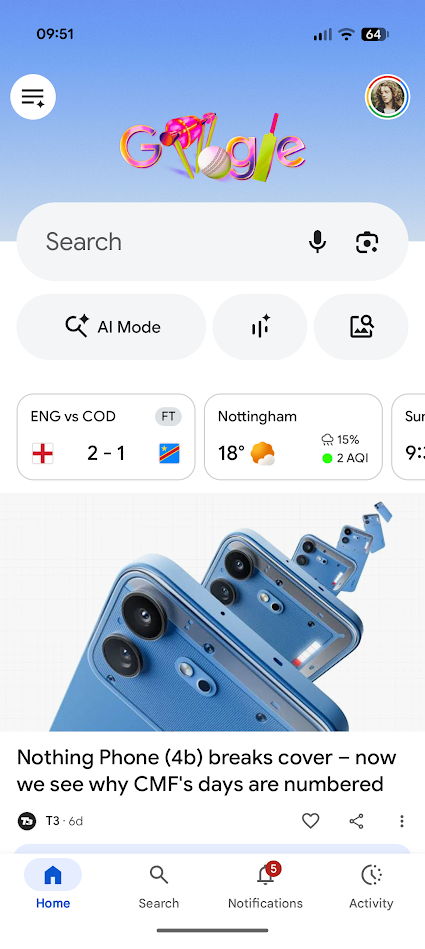
- Open the Google app.
- Tap the Google icon in the upper-left corner of your screen.
- Tap your profile picture in the upper-right corner of your screen.
- Scroll down and tap Settings.
- Scroll down and tap Other settings.
-
Toggle the Open web pages in the app switch off.
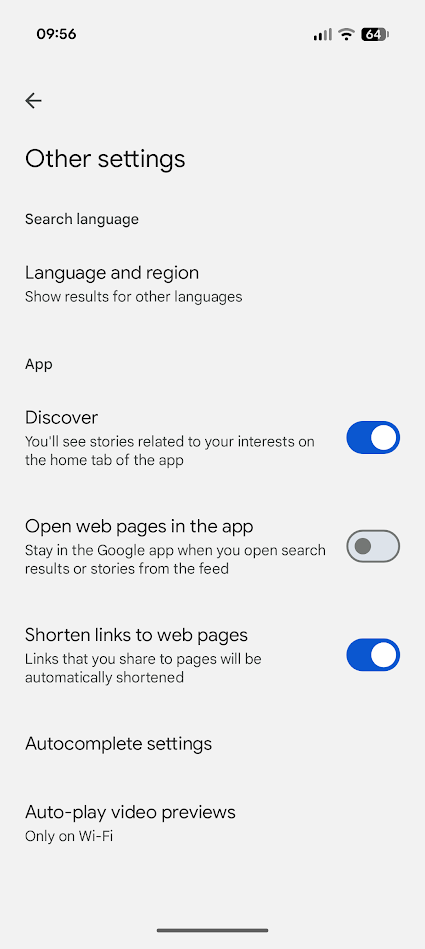


Entering a search will keep you in the Google app, but as soon as you tap a link, your default browser (in my case, Chrome) will open.
Some Google apps may ignore your default browser settings and always open Chrome for in-app links. Delete or disable Chrome to avoid this problem.
Gmail
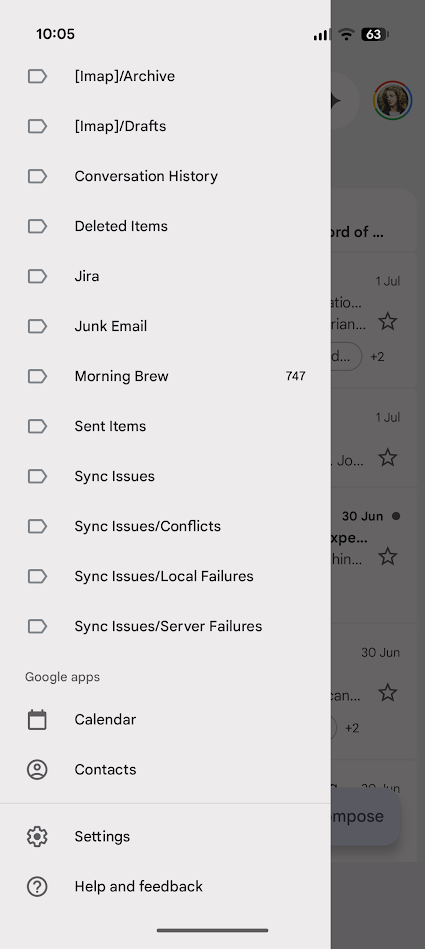
- Tap the three-line button in the upper-left corner of your screen.
- Scroll down and tap Settings.
- Tap General settings above the email addresses.
-
Scroll down and uncheck Open web links in Gmail.
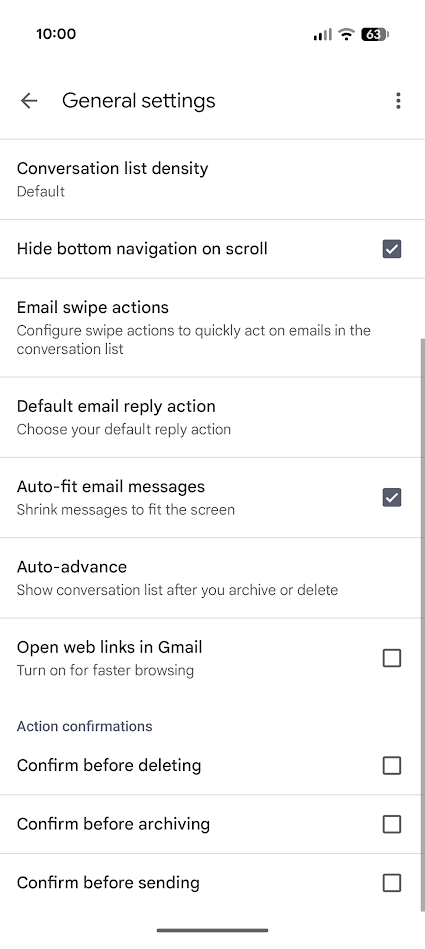


Be extra mindful of phishing links when opening links in Gmail with an external browser.
Instagram
- Head to your profile page.
- Tap the three-line button in the upper-right corner of your screen.
- Scroll down and tap Website permissions under the Your app and media heading.
- Tap Message links.
-
Toggle the Open in external browser switch on.
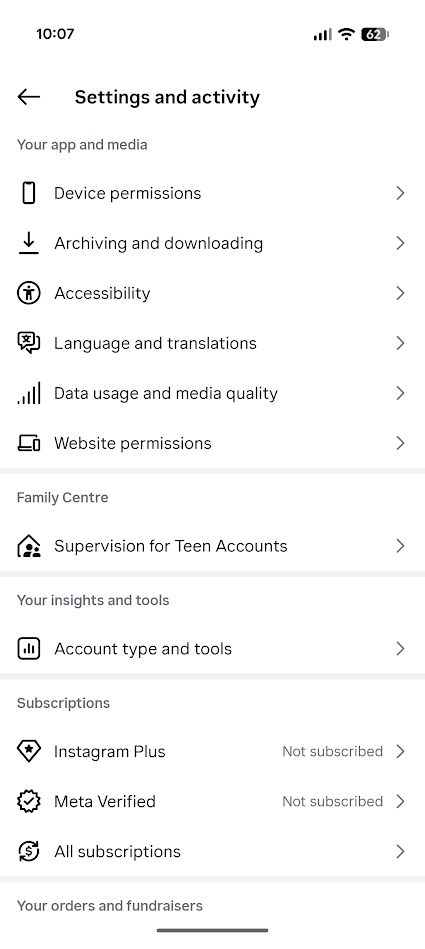
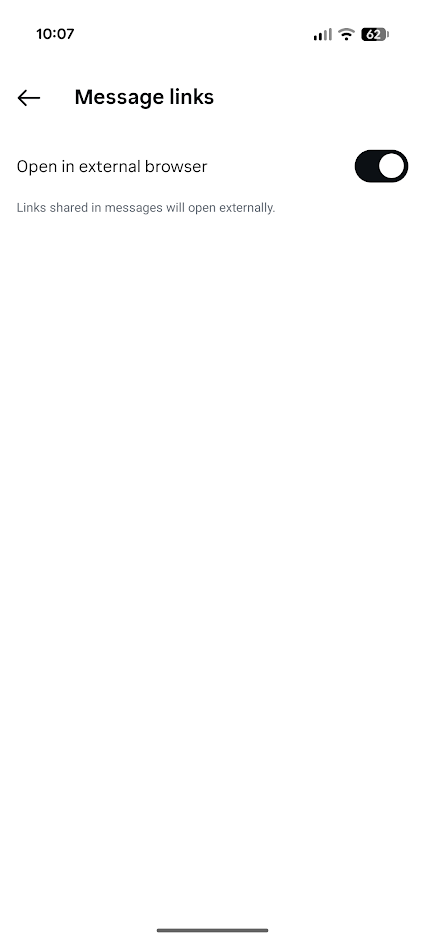


YouTube and Reddit do not have built-in functionality to disable their in-app browsers, but like Instagram, you can force Facebook to open links in external browsers.
 Quiz
Quiz
In-app browsers on Android
Trivia challenge
Think you know how Android apps handle web content under the hood? Put your
knowledge to the test.
WebViewSecurityBrowsersAPIsPrivacy
What is the name of the Android system component that most in-app browsers are built
upon?
Correct! Android WebView is the system component that allows Android
apps to display web content directly inside the app. It is powered by the Chromium engine and receives
updates independently through the Google Play Store.
Not quite — the answer is WebView. While WebKit is the underlying
rendering engine historically associated with browsers, Android’s specific component for embedding web
content in apps is called WebView, which is built on Chromium.
Which feature, introduced in Android 7.0 Nougat, made WebView safer by running it in
a separate process?
Correct! Android 7.0 Nougat introduced WebView sandboxing, which runs
WebView in a separate isolated process. This significantly reduced the security risk posed by malicious
web content, as it could no longer directly access the host app’s data.
The correct answer is WebView sandboxing. Introduced in Android 7.0
Nougat, this feature isolates the WebView renderer in its own process, limiting the damage that
compromised web content can do to the rest of the app or device.
What is the name of Google’s solution that allows apps to open web content in a
Chrome-powered overlay without leaving the app?
Correct! Custom Tabs is Google’s feature that lets apps open URLs in a
Chrome-powered browser experience that shares the user’s cookies, saved passwords, and autofill data. It
offers a faster, more integrated experience than a full WebView implementation.
The answer is Custom Tabs. It’s a feature that allows apps to launch a
browser-like experience using Chrome’s rendering engine without fully leaving the app. Unlike a basic
WebView, Custom Tabs share the user’s browsing state like cookies and passwords.
Which high-profile app was discovered in 2022 to be injecting JavaScript into web
pages through its in-app browser to potentially track user activity?
Correct! Researcher Felix Krause revealed in 2022 that TikTok’s in-app
browser injected JavaScript code capable of monitoring keystrokes and taps on external websites. TikTok
stated the code was used for debugging and performance monitoring, not for harvesting data.
The answer is TikTok. Security researcher Felix Krause found that
TikTok’s in-app browser injected JavaScript into visited web pages that could theoretically track
everything a user typed or tapped. The revelation sparked significant debate about in-app browser
privacy.
What Android API allows developers to specify that WebView should render content
using the same engine version as the installed Chrome browser?
Correct! The WebView Provider API allows the Android system to swap out
the WebView implementation. Since Android 7.0, Chrome and the standalone WebView package can both serve
as the WebView provider, ensuring the rendering engine stays current with Chrome updates.
The correct answer is the WebView Provider API. This API lets Android
determine which installed package — Chrome or the dedicated Android System WebView — acts as the
rendering engine for all WebView-based in-app browsers across the system.
In which version of Android did Google first make Android System WebView a
separately updatable component via the Play Store?
Correct! Starting with Android 5.0 Lollipop, Google separated Android
System WebView into a standalone app that could receive updates via the Google Play Store. This meant
security patches and improvements could be pushed without requiring a full OS update.
The answer is Android 5.0 Lollipop. Google made Android System WebView
independently updatable through the Play Store starting with Lollipop, which was a big deal for security
— it meant WebView vulnerabilities could be patched quickly without waiting for a system update.
What is a Trusted Web Activity (TWA) primarily used for in the Android ecosystem?
Correct! Trusted Web Activities allow developers to package Progressive
Web Apps (PWAs) as Android apps that run fullscreen using Chrome as the rendering engine. The experience
is indistinguishable from a native app, but the content is entirely web-based.
The answer is running Progressive Web Apps fullscreen using Chrome as
the renderer. TWAs are a powerful way for developers to ship PWAs on the Play Store, with Chrome
handling all the rendering while the user sees a seamless, fullscreen app-like interface.
What does enabling ‘JavaScript’ in a WebView-based in-app browser primarily risk if
the loaded page is malicious?
Correct! Enabling JavaScript in a WebView opens the door to cross-site
scripting (XSS) attacks. A malicious page could potentially execute scripts that access app data,
interact with the JavaScript bridge, or manipulate the app’s behavior in unintended ways.
The correct answer is cross-site scripting attacks that could steal app
data. When JavaScript is enabled in a WebView and a malicious site is loaded, XSS attacks become
possible — scripts can potentially interact with any JavaScript interface the app has exposed to the
WebView.
Your Score
/ 8
Thanks for playing!
Why in-app browsers matter, and why it’s worth disabling them
They’re convenient, but not always the best tool to use
As previously mentioned, many apps force in-app browsers for links. Most of the time, this is for security reasons.
An in-app browser is a sandbox controlled by the app.
The app can prevent you from being redirected, and they disable all third-party browser extensions. They restrict tracking cookies and skip the need to re-authenticate data.

However, there are other security risks inherent to in-app browsers.
Apps can theoretically capture detailed data, including keystrokes. As demonstrated in 2022 by privacy researcher Felix Krause, the TikTok app was capable of logging all activity.
In-app browsers generally lack the security tools present in browsers like Chrome and Firefox that warn you when you’re in danger of a security breach.
However, because an app uses an in-app browser doesn’t mean it’s not secure.
As long as you only use it for short actions (for example, logging in to your Google account), you should be safe.

The more direct problem is their usability.
Every time you open a link in Gmail and then close the in-app browser, that browsing history is gone forever.
Great from a security standpoint, but frustrating for workflow.
Countless are the times when I’ve opened a link in Gmail, done further browsing, and then been unable to find my route later on.
For security, always use native apps
Or just ditch the social media apps entirely
A common way to reduce social media use is to delete the app.
Instagram, Facebook, Reddit, and other social media apps can be accessed from a mobile web browser, so it’s an effective way to reduce your reliance on these apps.
However, there’s a catch.
Apps operate within the confines of the Android OS, which means they can take advantage of its security features.
If you frequently use a service with an Android app, switch to the app.
In-app browsers have their uses, but they are too frustrating to rely on
Since I forced Google, Gmail, and Instagram to use Chrome, my browsing experience has drastically improved.
It’s such a simple change, and while I appreciate the reasons why I can’t flick a system-level switch to disable app in-app browsers, I’ll keep disabling them wherever I can.